
◆ DOWNLOADS
GET THE MODPACK
Pick your preferred format. Each download is fully self-contained — drop it into your launcher and you're ready.
RECOMMENDED
All three downloads include the self-updating Cesura Core — your client always stays in sync with the live server.
The CurseForge listing on curseforge.com is the exception, due to platform policy.
RECOMMENDED

Modrinth
Direct .mrpack download for the Modrinth App or Prism Launcher. Auto-updating Cesura Core included.
How to install ▾
Just double-click the .mrpack file and the Modrinth App will install it automatically.
RECOMMENDED

CurseForge
Direct .zip download for the CurseForge App. Auto-updating Cesura Core included.
How to install ▾
- Open the CurseForge App and click the + in the top right of the My Modpacks tab.
- Pick Import.
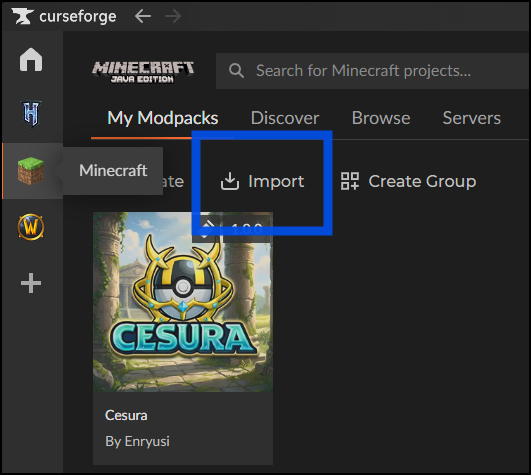
- Select the downloaded Cesura-x.x.x.zip file.
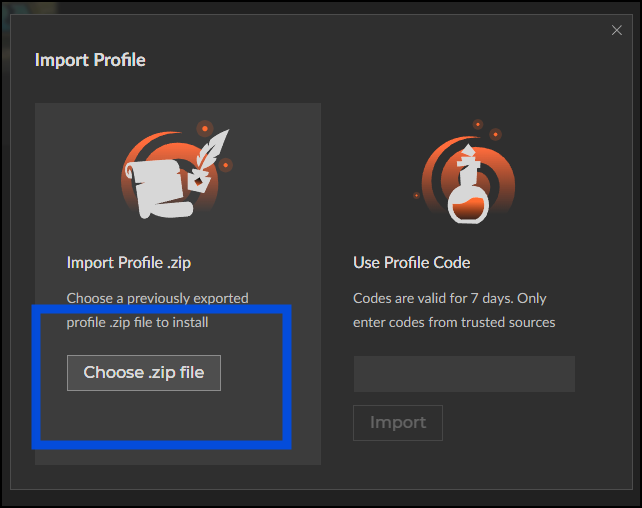
CurseForge will install the modpack automatically.
RECOMMENDED
Z
Manual ZIP
Plain ZIP with mods/ and config/ folders. For players who manage their own Fabric setup.
How to install ▾
- Install Fabric Loader for Minecraft 1.21.1.
- Extract the ZIP and copy the mods/ and config/ folders into your .minecraft directory.
- Launch Minecraft with the Fabric profile.
J
Cesura Core JAR
Standalone Cesura Core mod JAR. For players who already have a Fabric 1.21.1 setup and just want the Cesura companion mod.
◆ TECHNICAL REQUIREMENTS
MINECRAFT
1.21.1
LOADER
FABRIC
RAM
6 GB MIN
JAVA
21+
◆ NEED HELP?
Having trouble installing?
Our community is happy to help — ask in the Discord.
JOIN DISCORD ↗